FAQs: What handheld model do I have?
Q: What handheld model do I have?
A: We have 3 models in circulation:
EA520
EA602
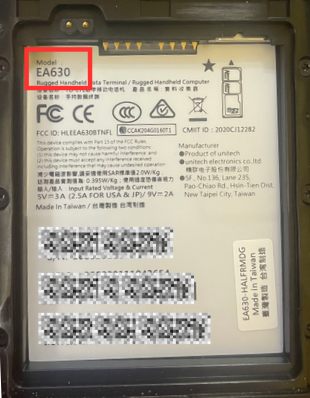
EA630
Q: I am still not sure, how else would I find out?
A: Take the back cover off and remove the battery. The label underneath the battery will display the model:
Related Articles
FAQs: Handheld Repair Service - Warranty Information
Q: Does my handheld have a warranty? A: Yes, all handhelds come with a 1-year warranty. Q: What is covered under the warranty? A: Check out the warranty details on the Unitech website at http://ute.com/us/program. Q: How do I send my handheld in for ...How To: Turn Off Handheld Scanner Beep
The beep sound can be easily disabled on handheld scanners if you prefer not to have the sound notification when scanning items. How to Turn Off Scanner Beep (1 min) Swipe down from the top of the screen. Tap USS Scan Service. Press the three dots in ...Troubleshooting: Lost PIN Number on EA520 Handheld
A PIN number is required for logging into a Unitech Handheld and the PIN number is either lost or forgotten. Turn off the device. Long press the power button and volume up button simultaneously to enter the Bootloader Menu. Press the volume down ...Troubleshooting: ISBN-13 Barcodes not Scanning on EA520 Handheld
ISBN-13 (book) barcodes are not scanning on EA520 Handheld. Figure 1. Example ISBN-13 Barcode Symbology settings on handheld are not set to read ISBN-13 barcodes. To configure a handheld to read ISBN-13 barcodes, follow these steps: Swipe down from ...Handheld Resource Guide
After purchasing and receiving a handheld, follow this guide to ensure proper setup. <br>
Popular Articles
How To: Find Your Yellow Dog Inventory Version
Understanding which version of Yellow Dog Inventory you're using is essential when exploring new features, as some enhancements and functionalities are specific to certain versions. All client types can benefit from knowing their Yellow Dog Inventory ...Feature Overview: Par & Re-Order Points
Par levels and reorder points help streamline purchasing in Yellow Dog. Par level is the ideal quantity to keep on hand. Reorder point is the minimum quantity that triggers reordering. You can update par and reorder points in the following locations: ...How To: Install the Zebra ZD411 Printer Driver
End user · Yellow Dog Inventory 2026 WHY IT'S IMPORTANT When you install the correct driver, Windows can communicate with your Zebra ZD411 printer so it prints labels and tags reliably from Yellow Dog Inventory. Without the driver, the ZD411 will not ...FAQs: What are Bins?
End user · Yellow Dog Inventory 2026 Question: What are Bins? Answer: Bins are optional location identifiers that specify exactly where an item is stored. The Bin field is free text, so you can use letters or numbers. You don’t need to create bins in ...Food and Beverage User Manual
The Food & Beverage User Manual is your key to understanding the potential of Yellow Dog. Whether you're a first-time user or a seasoned pro, this detailed manual will help you understand how to best utilize your Yellow Dog Inventory system. Download ...